Attribute Name
Description
Type
Values
Default Value
Left
Left position in Twips
Integer
0
Top
Top position in Twips
Integer
0
Right
Right position in Twips
Integer
0
Bottom
Bottom position in Twips
Integer
0
LeftF
Left position in Twips
Float
0.00F
TopF
Top position in Twips
Float
0.00F
RightF
Right position in Twips
Float
0.00F
BottomF
Bottom position in Twips
Float
0.00F
Page
Page Index where object is located. Page Number is Page Index + 1.
Integer
>= 0
0
Text
String of text contained in object.
String
NULL
TextColor
Color for drawing text.
Color
COLORREF (bbggrr) 000000 to FFFFFF
or in or in COLORREF (aabbggrr) 00000000 to FFFFFFFF
000000 (Solid black)
TextFont
Font name and style for drawing text
Font
String in the form of: FontName,FontSize, Weight,Italic,Underline
Example: "Arial,14,400,0,0"
NULL
BackColor
Background color.
Color
COLORREF (bbggrr) 000000 to FFFFFF
or in COLORREF (aabbggrr) 00000000 to FFFFFFFF
FFFFFFFF (Transparent)
HorzAlign
Horizontal text alignment.
enum acHorzAlign
1: acHorzAlignLeft
2: acHorzAlignCenter
3 :acHorzAlignRight
4: acHorzJustify
1: acHorzAlignLeft
VertAlign
Vertical text alignment.
enum acVertAlign
1: acVertAlignTop
2 :acVertAlignCenter
3 :acVertAlignBottom
1: acVertAlignTop
TextGap
Gap between text and borders.
enum acTextGap
Units are in points or 12th of an inch.
0: acTextGapNone
1: acTextGapThin
2 :acTextGapMedium
3: acTextGapThick
0 :acTextgapNone
BorderColor
Color for drawing text border.
Color
COLORREF (bbggrr) 000000 to FFFFFF
or in COLORREF (aabbggrr) 00000000 to FFFFFFFF
000000 (Solid black)
BorderWidth
Width of border around text.
enum acBorderWidth
Units are in points or 12th of an inch.
0: acBorderWidthNone
1: acBorderWidthSimple
2: acBorderWidthDouble
3: acBorderWidthTriple
4: acBorderWidthQuadruple
0: acBorderWidthNone
Hyperlink
Clicking on the object in Run mode will navigate to the specified location
String
Using URL: http://, ftp: // , mailto:// ,
Using Bookmark: #Ref ex: #Pages[2]
CharSpacing
Spacing between characters.
Integer
10th of a Twip
0
WordSpacing
Spacing between words.
Integer
10th of a Twip
0
TextAngle
Angle for drawing text.
Integer
10th of a degree
0
Locked
Object cannot be modified
Boolean
True / False
False
Horizontal Scale
Horizontal scaling factor.
Integer
Percentage
100
Indentation
Paragraph indentation.
Integer
10th of a Twip
0
Allow Word Breaks
Allows breaking words on special characters ( +, -, *, (, ), =, etc).
Boolean
True / False
False
Single line
Text is limited to a single line.
Boolean
True / False
False
FormattedText
It is the string contents of the cell that includes formatting information such as Bold or Italic.
String
NULL
The Formatted Text property allows the user to specify the text that has some sections formatted with a given format style such as: font size, color, bold, italics, underlined, strike-through, etc.
The notations mentioned below are used to specify the needed formats:
Notations |
Meaning |
|---|---|
b |
Bold |
i |
Italics |
u |
Underline |
s |
Strike-through |
fs |
Font size multiplied by 100. |
fc |
Font Color, and the color number is hexadecimal. |
The text section should be enclosed with tags to specify the formatting. For example: <b>Hello World</b> will make the text "Hello World" to be bold.
If a style has an attribute like in the case of font size and font color, we add a colon to the opening tag and append the attribute after it, for example: <fs:1200>Hello World</fs> will set the text "Hello World" to a font size of 12.
Example
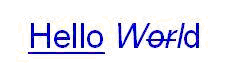
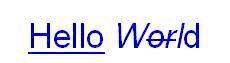
<fc:FF0000><fs:2400><u>Hello</u><i>W<s>or</s>l</i>d</fs></fc>displays as:
Hidden
Hidden in certain report states
Integer
A binary combination of the following values:
1: Hidden in Run mode
2: Hidden in Design mode
4: Reserved value
8: Hidden in Print preview
16: Hidden in Annotation mode
0: Always visible
TextRenderingMode
Defines various ways of rendering text to the display or printer.
Integer
0: Fill text
1: Stroke text
2 Fill, then stroke text
3: Neither fill nor stroke text (invisible)
0: Fill text
ClipPoints
Points that define the clip region.
Array of Points
NULL
ClipOps
Operations that define how the points are connected.
Array of enum PolyOps
0: acNoOp
1: acCloseFigure
2: acLineTo
4: acBezierTo
6: acMoveto
16: acClip_Winding
32: acClip_Alternate
0: acNoOp
Annotation
Object is saved as an annotation as opposed to a drawing within the page contents
Boolean
True / False
False for static objects such as lines, polygons and text. True for dynamic objects such as form fields or high-lighters
TextClipping
Show or do not show text that spills outside the rectangle.
Boolean
True/False
False
AutoResize
Automatically change the size of the text object to fit all its text.
Boolean
True/False
False
StrokeColor
The color of the stroke used to draw the text.
Color
COLORREF (bbggrr) 000000 to FFFFFF
or in COLORREF (aabbggrr) 00000000 to FFFFFFFF
000000 (Solid black)
StrokeWidth
The width of the stroke used to draw the text.
Float
1
StrokeStyle
The style of the stroke used to draw the text.
enum acStrokeStyle
0: acStrokeStyleContinuous
1: acStrokeStyleDashed
2: acStrokeStyleDotted
0: acStrokeStyleContinuous
Styles
The first value specifies the length of the first dash in a user-defined style, the second value specifies the length of the first space, and so on.
Int Array
0
StylesF
Same Styles, but it use Float values more accurate.
Float Array
0
CanActivate
User can Activate.
Boolean
True/False
True
LayerID
ID layer which belongs the object.
String
UpsideDown
Flips the text with its horizontal axis.
Boolean
True/False
False
FlipHorizontal
Flips the text with its vertical axis.
Boolean
True/False
False
XAML
XAML representation of the object
String
Visible
Object is visible when document is printed
Boolean
True / False
Active
*ReadOnly
Object is Activate.
Boolean
True/False
False
RightToLeft
Reverses the text, backwards effect.
Boolean
True/False
False
BlendMode 
Blends the color object according to a define mode. This blending is also applied to the object when it is saved or printed.
enum acBlendMode
0: acBlendModeNormal
1: acBlendModeMultiply
2: acBlendModeScreen
3: acBlendModeOverlay
4 : acBlendModeDarken
5: acBlendModeLighten
6: acBlendModeColorDodge
7: acBlendModeColorBurn
8: acBlendModeHardLight
9: acBlendModeSoftLight
10: acBlendModeDifference
11: acBlendModeExclusion
12 : acBlendModeHue
13: acBlendModeSaturation
14 : acBlendModeColor
15: acBlendModeLuminosity
16: acBlendModeCompatible
0: acBlendModeNormal