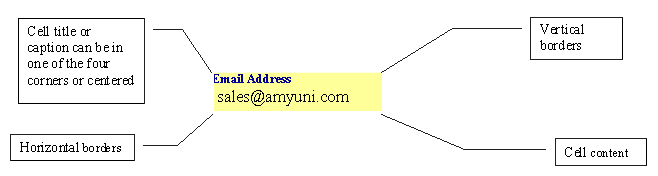
Attribute Name
Description
Type
Values
Default Value
xPos
*Read only
Horizontal position in Twips.
Integer
>= 0
0
Width
Width of cell in Twips. Changing this property changes the width of the column where the cell is located.
Integer
>= 0
2248
Text
Multiline text contained in cell.
String
NULL
Font
Font used to draw cell’s content.
Font
If empty, default document font is used
NULL
TextColor
Color used to draw text.
Color
COLORREF (bbggrr) 000000 to FFFFFF
COLORREF (aabbggrr) 00000000 to FFFFFFFF
000000 (Solid black)
HorzAlign
Horizontal text alignment.
enum acHorzAlign
1: acHorzAlignLeft
2: acHorzAlignCenter
3: acHorzAlignRight
4: acHorzJustify
1: acHorzAlignLeft
VertAlign
Vertical text alignment.
enum acVertAlign
1: acVertAlignTop
2: acVertAlignCenter
3: acVertAlignBottom
3: acVertAlignBottom
TextGap
Gap between text and borders.
Integer
Units are in points or 12th of an inch.
0: None
1: Thin
2: Medium
3: Thick
1: Thin
DataType
Type of data expected in the field object.
enum acDataType
0: acDataTypeUnknown
1: acDataTypeText
2: acDataTypeNumerical
3: acDataTypeDate
0: acDataTypeUnknown
Format
Mask used to format the data contained in the field.
Text
The formats for each DataType are similar to what is provided by Microsoft Excel®.
NULL
TitleColor
Color for cell title.
Color
COLORREF (bbggrr) 000000 to FFFFFF
COLORREF (aabbggrr) 00000000 to FFFFFFFF
000000 (Solid black)
TitleText
Cell title.
String
NULL
TitleFont
Cell title font.
Font
If empty, default document value is used
NULL
TitlePosition
Position of cell’s title.
enum acTitlePosition
1: acTopLeft
2: acTopCenter
3: acTopRight
4: acBottomLeft
5 : acBottomCenter
6: acBottomRight
1: acTopLeft
TitleVertical
Draw cell’s title vertically.
Boolean
True/ False
False
HorzBorders
Top and bottom cell borders.
enum acHorzBorders
0: acHorzBordersNone
1: acHorzBordersTop
2: acHorzBordersBottom
3: acHorzBordersTopBottom
0: acHorzBordersNone
VertBorders
Left and right cell borders.
enum acVertBorders
0: acVertBordersNone
1: acVertBordersLeft
2: acVertBordersRight
3: acVertBordersLeftRight
0: acVertBordersNone
BorderColor
Color for drawing text border.
Color
COLORREF (bbggrr) 000000 to FFFFFF
COLORREF (aabbggrr) 00000000 to FFFFFFFF
000000 (Solid black)
BorderWidth
Width of border around cell.
Integer.
Units are in points or 12th of an inch.
0: acBorderWidthNone
1: acBorderWidthSimple
2: acBorderWidthDouble
3: acBorderWidthTriple
4: acBorderWidthQuadruple
0: acBorderWidth None
BackColor
Background color.
Color
COLORREF (bbggrr) 000000 to FFFFFF
COLORREF (aabbggrr) 00000000 to FFFFFFFF
FFFFFFFF (Transparent)
CharSpacing
Spacing between characters.
Integer
10th of a Twip
0
WordSpacing
Spacing between words.
Integer
10th of a Twip
0
Editable
Field can be modified by user when the document is compiled or saved in view only mode.
Boolean
True / False
False
Vertical
Vertical text.
Boolean
True / False
False
xMain
When multiple cells are grouped together, xMain and yMain contain the main cell of the group.
Integer
0
yMain
When multiple cells are grouped together, xMain and yMain contain the main cell of the group.
Integer
0
xSpan
When multiple cells are grouped together,Xspan contains the number of cells covered by the group.
Integer
1
ySpan
When multiple cells are grouped together,ySpan contains the number of cells covered by the group.
Integer
1
MergeOption
When the cell is grouped with other cells, specifies in which direction the cell is grouped (right, left, top, bottom).
Integer
0
Value
Result of compiling the formula contained in the Text property.
String
NULL
Result
It is the final value that the user sees after applying any formatting.
String
NULL
Hyperlink
It is the link targeted when the object is clicked.
String
NULL
FormattedText
It is the string contents of the cell that includes formatting information such as Bold or Italic.
String
NULL
The Formatted Text property allows the user to specify the text that has some sections formatted with a given format style such as: font size, color, bold, italics, underlined, strike-through, etc.
The notations mentioned below are used to specify the needed formats:
Notations |
Meaning |
|---|---|
b |
Bold |
i |
Italics |
u |
Underline |
s |
Strike-through |
fs |
Font size multiplied by 100. |
fc |
Font Color, and the color number is hexadecimal. |
The text section should be enclosed with tags to specify the formatting. For example: <b>Hello World</b> will make the text "Hello World" to be bold.
If a style has an attribute like in the case of font size and font color, we add a colon to the opening tag and append the attribute after it, for example: <fs:1200>Hello World</fs> will set the text "Hello World" to a font size of 12.
Example
<fc:FF0000><fs:2400><u>Hello</u><i>W<s>or</s>l</i>d</fs></fc>displays as: