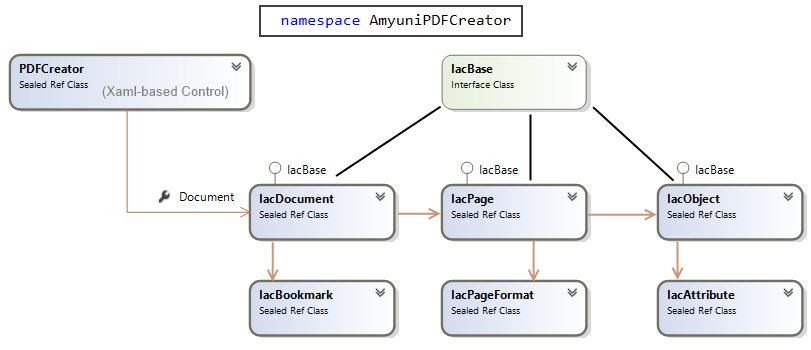
The Class library AmyuniPDFCreator is composed by a main Xaml-based control and several related UWP Classes.
The entry point for the library in an Xaml-based project will usually be the class AmyuniPDFCreator.PDFControl.
Xaml controls cannot be used in HTML5/JavaScript-based projects, so in those project the entry point will be AmyuniPDFCreator.IacDocument class instead.
Figure: Class Diagram for main classes in AmyuniPDFCreator class library.
AmyuniPDFCreator.PDFControl Class
This class is a Xaml graphic control that renders PDF files on the screen and notifies the client application about user interface events.
The property AmyuniPDFCreator.PDFControl.Document contains a reference to the document object that should be used for opening/saving files, retrieving page objects, and processing PDF files in general..
AmyuniPDFCreator.IacDocument Class
IacDocument is the class that represents a PDF document. It contains an array of pages, each represented by the IacPage class, and it also contains bookmarks (also called Document Outlines) represented by the class AmyuniPDFCreator.IacBookmarks.
IacDocument is the entry point for loading and saving PDF files. It is not an Xaml control, hence it can be use from HTML5/JavaScript projects.
AmyuniPDFCreator.IacPage Class
This class represents a page object. Each page contains an array of objects represented by the IacObject class. Any object contained in a page, such as text, lines, images, annotations is represented by an IacObject object. Objects in a page can be enumerated, or retrieved by name, or by a rectangular region.
The method IacPage.GetPageFormat returns an instance of the class IacPageFormat that contains the entire page formatting information such as paper size and orientation. Both IacDocument and IacPage contain a single instance of IacPageFormat. The instance contained by IacDocument represents the default page format that is used when a new page is created. The instance contained in IacPage represents the page format for each specific page.
AmyuniPDFCreator.IacObject Class
An instance of this class represents a graphic object on a page such as text, polygons, raster images, annotations and form fields. IacObject contains a list of attributes represented by the IacAttribute class. The developer communicates with objects by reading or setting various object attributes.
Example: Changing the text attribute for a specific object:
IacAttribute text = object.Attribute("Text");
text.Value = "Change the text of this object";
IacDocument, IacPage and IacObject implement the interface IacBase . This interface enables the developer to read and write various attributes that are not directly available through the IacDocument, IacPage or IacObject classes. These attributes are detailed in the coming sections and include various things such as the document title or subject.