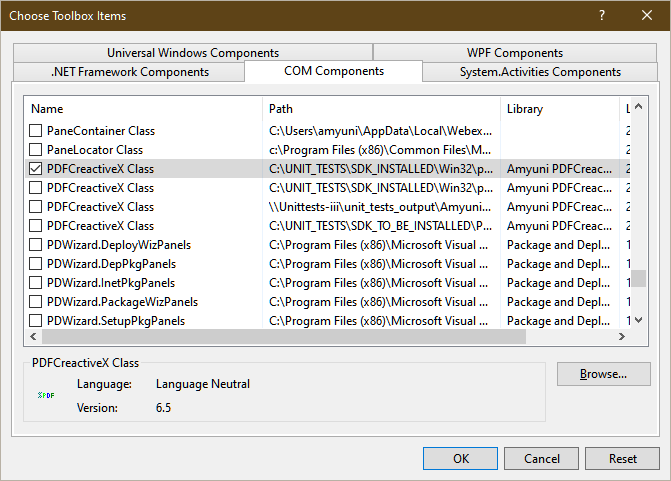
This is specific to each development environment, but the procedure is very similar in all cases. The PDFCreator component should be added to an existing project by using the Form Designer’s toolbox Add Components context menu item (Choose Items in VS2017) dialog box as follows:
Right-click on the toolbox in the form designer and select Choose Items:
Once inserted into the project, the component appears in the components toolbar and can be inserted on a form.
Inserting the control in Visual Studio 2005-2008
When the developer wants to insert the control in Visual Studio 2005, he must first add the OLE Automation COM reference to the project. To do this, Right-click References in the Solution Explorer and choose Add... from the popup menu. A dialog box will show up. Go to the page on that dialog that is labeled “COM” and from the list of COM type libraries on that page check the OLE Automation library and hit OK. Now, the component can be dragged from the toolbox onto the form without error.
The reason behind this procedure is that Visual Studio 2005 unlike its predecessor VS2003, does not automatically add the necessary and needed COM reference to the OLE Automation type library - stdole.tlb or stdole2.tlb.
